No-code web scraper for Chrome · free to start
Turn the page you’re on
into a spreadsheet.
Extract data from the website you’re on into Excel or CSV. Open HeyScraper beside a search, a shop or a directory, and every item on the page becomes a row.
500 pages a month free. No card, no account.

Example data
You found the list.
Now copy 205 rows by hand?
Select, copy, paste, fix the columns, then do it again for the next page. A long list takes an evening, and one slip shifts every row below it.
Example data
Scrape a website in four steps.
You see the rows first.
- 1Open the side panelClick the HeyScraper icon. The panel opens beside the page.
- 2Check the previewIt finds the list for you, or you click the values you want.
- 3Add more pagesTurn on Multiple pages to go past page one.
- 4Download to Excel or CSVOr JSON, or copy the table.
Nothing is collected until you press Start collecting.

Page one is never the whole list.
Scrape every page.
Turn on Multiple pages. HeyScraper scrolls or clicks Next for you, with a stop limit and a wait between pages, so you go easy on the site.

The list is only half the story.
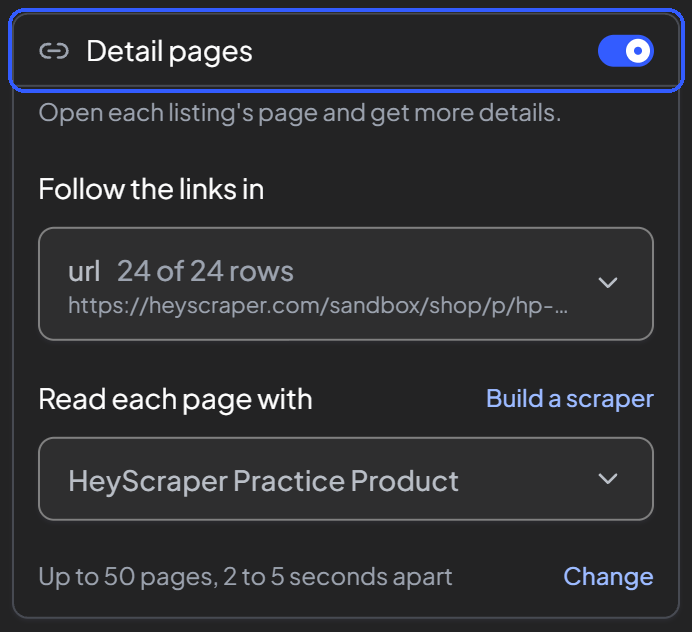
Open each listing too.
When a column holds links, HeyScraper offers to collect each linked page. Then the list and the details go into one table.
Popular sites are ready.
So are the questions.
Ready-made scrapers match the page by themselves. Many come with step-by-step playbooks that turn the rows into an answer.
Home buyers · playbook
"Is this price fair next to similar homes?"
Home buyers · playbook
"Which sellers already cut their price?"
Real-estate investors · playbook
"Which homes could earn the most rent for their price?"
Example data
What matters before you start
HeyScraper is not for you if
- you need it to collect on its own at set times. It collects when you press Start.
- your data must never leave your computer. Our server reads the page to pull out the rows.
- you want a live link to an online spreadsheet. You download CSV, JSON or Excel, or copy the table.
- you use Firefox or Safari. HeyScraper is a Chrome extension.
Free to start.
Pay for the pages you collect.
Only pages that come back with data count. A list page and a detail page are one page each.
Free
$0
500 pages a month.
Starter
$24/month
1,250 pages a month.
Or $264 a year (11 months).
Pro
$59/month
5,000 pages a month.
Or $649 a year (11 months).
Business
$129/month
20,000 pages a month.
Or $1,419 a year (11 months).
Upgrade from inside the extension. Paid plans are handled by Turtle Tasks. Not satisfied? Full refund within 7 days, for any reason. A run that starts with pages left may go past zero to finish that job, using up to 100 extra pages in total each 30 days.
Good to know
Your questions, answered.
Your next list,
in Excel or CSV.
Add it to Chrome, and a short tour shows you how it works.